Why Scripts Fail Only When Run From Another Directory
Why a script fails when run from another directory: relative paths, the working directory, cron and systemd, finding the script folder, and how to test it.
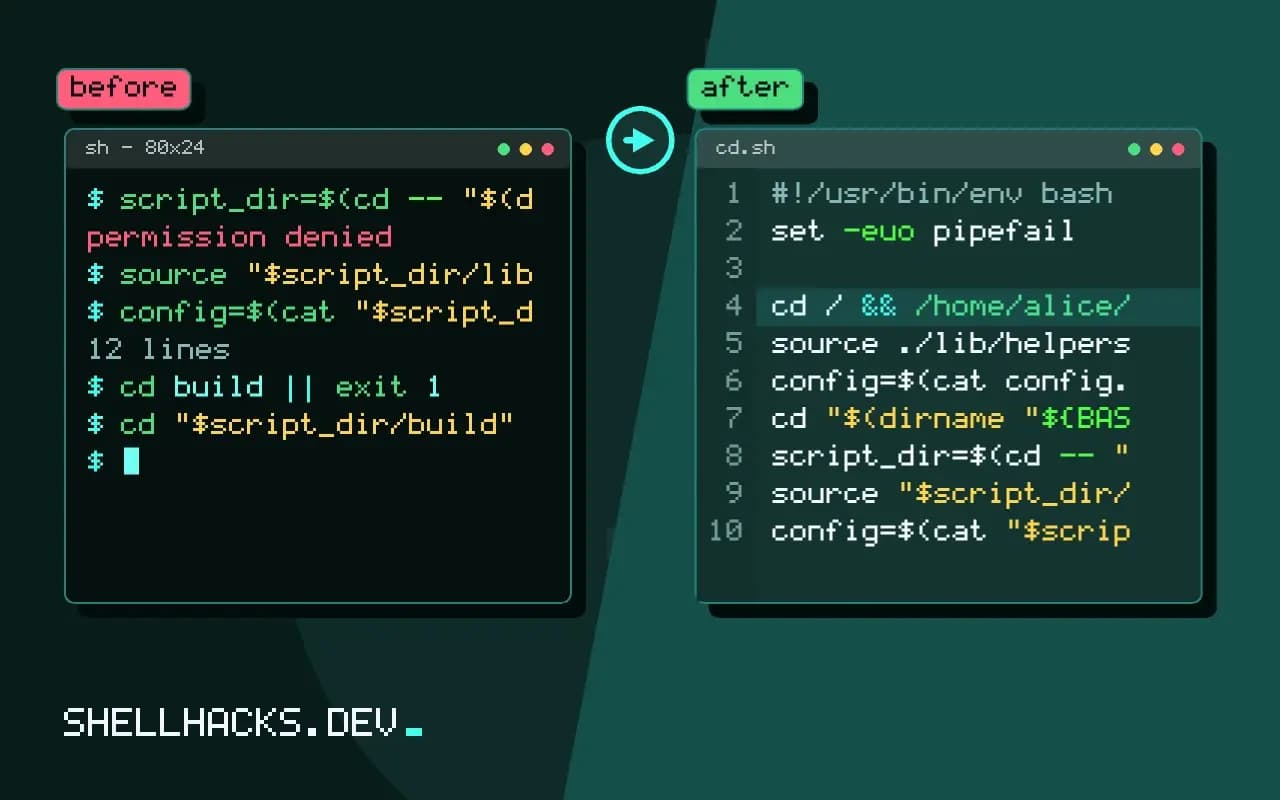
The script works from the project directory and breaks from anywhere else: cat: config.yml: No such file or directory, or it quietly reads the wrong config.yml that happens to be in the current folder. The cause is a path that was meant as "next to the script" and is interpreted as "in the directory the caller is in". The folder lookup is explained in portable realpath and readlink. The examples assume Bash 5.2.
See the problem
cat tool/run.sh
cd tool && ./run.sh
cd / && /home/alice/tool/run.sh#!/usr/bin/env bash
source ./lib/helpers.sh
config=$(cat config.yml)
./lib/helpers.sh: line 1: ./lib/helpers.sh: No such file or directory
Every ./ and bare relative name is resolved against the current working directory ($PWD), which belongs to the caller, not to the script. It works when the author runs it from inside the project and when tests do the same. A script called through a symlink, from a cron job, from a CI step in another folder or from an absolute path hits the bug.
Fix 1: change to the script's directory
#!/usr/bin/env bash
set -euo pipefail
cd "$(dirname "${BASH_SOURCE[0]}")"

source ./lib/helpers.sh
config=$(cat config.yml)
One line at the top makes the rest of the script behave as if it were run from its folder. It is the quickest fix and has a downside: the script's arguments that are relative paths (./run.sh data/in.csv) now resolve from the script's directory, not from where the user typed them. If your script takes file arguments, do not change directory; resolve them first or use method 2.
Fix 2: build absolute paths
script_dir=$(cd -- "$(dirname -- "${BASH_SOURCE[0]}")" && pwd -P)
source "$script_dir/lib/helpers.sh"
config=$(cat "$script_dir/config.yml")
input=$(realpath -- "${1:?usage: run.sh FILE}")     # caller's relative path
Compute the folder once and use it for everything that belongs to the script. Caller-supplied paths stay relative to where they ran it. pwd -P resolves symlinks in the directory part; if the script itself may be a symlink, resolve the final component as well with a readlink loop. BASH_SOURCE[0] is correct even when the file is sourced, where $0 is not, see sourcing versus executing.
cron and systemd start somewhere else
* * * * * cd /srv/app && ./job.sh >> /var/log/job.log 2>&1
[Service]
WorkingDirectory=/srv/app
ExecStart=/srv/app/job.sh
Cron runs jobs from the user's home directory, and systemd from / unless WorkingDirectory= is set. A script that depends on the working directory therefore works in your terminal and fails when scheduled, one more case from terminal versus cron. Set the directory in the scheduler and make the script independent of it; the second is the more reliable.
Beware of relative cd
cd build || exit 1           # relative: depends on where you started
cd "$script_dir/build" || exit 1
cd "$OLDPWD"                 # go back to where the caller was
( cd "$script_dir/build" && make )     # subshell: caller's directory unchanged
A cd to a relative path compounds errors if an earlier cd failed; always check the result, and prefer a subshell for a temporary change of directory. Sourced libraries should not change the caller's directory at all.
Test from elsewhere
cd / && /home/alice/tool/run.sh
cd /tmp && bash /home/alice/tool/run.sh
ln -s /home/alice/tool/run.sh /tmp/link-run && /tmp/link-run
Run the script from /, from /tmp and through a symlink; if it passes, the path handling is sound. Add that to the tests, as in testing Bash functions. Also run it with a different HOME to catch hidden dependence on your files.
Three directories that get confused
Scripts deal with three locations, and bugs come from mixing them up. The first is where the script file lives, which is fixed once installed. The second is the current directory of the process, which belongs to whoever started it. The third is the project or data directory the script operates on, which may be either of the others or something else entirely. Decide which each path in the script refers to, and spell it that way. Files shipped with the script, such as templates or helper libraries, are relative to the first. Files the user supplies, such as inputs and outputs, are relative to the second. Targets such as an installation prefix come from configuration.
When the three are named explicitly in variables, script_dir, work_dir and target_dir, the code documents itself and the bugs become visible in review. A bare ./config.yml in the middle of a function says nothing about which of the three it means, and that ambiguity is the root of the problem.
Symlinks, relative invocations and resolving
The path in BASH_SOURCE is whatever was used to invoke the script. If someone runs it through a symlink in /usr/local/bin, the directory computed from it is the one containing the link, not the one containing the real files. Resolve the link before taking the directory: readlink -f works on Linux, and on macOS recent versions provide it, with realpath as an alternative. Sourced files see their own path in BASH_SOURCE[0], while $0 still names the top-level script, which is why libraries should use the former.
Spaces and unusual characters in the path break unquoted expansions. A project in a folder named "Project Files" works until the first unquoted $script_dir. Quote every use, and test in a directory with a space in its name; it is the cheapest portability check there is.
Relative paths in arguments and outputs
When a script changes directory, relative arguments change meaning. If the user types tool process data/in.csv from their project and the script does cd "$script_dir" first, the path now points into the tool's installation. Convert user paths to absolute ones before changing directory: input=$(realpath -- "$1"). The same applies to output: say where results are written and print the absolute path at the end, so users know where to look without guessing.
Temporary files deserve the same thought. Create them with mktemp under the system temporary directory, not in the current directory, since the current directory might be read-only, a network share or a repository the tool should not litter.
Where this shows up in tests
Test suites hide this bug because they run from the project root. Add one test that changes to an unrelated directory before invoking the script, and one that runs it through a symlink, as shown above. In CI, run the script from a different working directory than the one the checkout creates. These tests take seconds to write, and they turn a class of failure that only appears in other people's environments into one that fails on your machine first.
Document the assumption in the script's header comment, in one line: whether it must be run from a particular directory, whether it changes directory and where it writes. A reader who sees "runs from anywhere, writes to the current directory" knows how to call it and what to expect, without opening the code. If the behaviour ever has to change, that line is the one to update.
Where this does not apply
Some tools are meant to act on the current directory (like git or make); a script that wraps them should keep that behaviour and say so. For installed commands, put the files in fixed locations such as /usr/local/lib/tool and reference them by absolute path, not by searching relative to the executable. See the Bash manual for BASH_SOURCE and the systemd WorkingDirectory documentation.